AI Model Configuration
JTC RPA has built-in AI capabilities, supporting features such as AI Condition, AI Switch, and AI Smart Extraction. Before using these features, you must configure an API key from at least one AI model provider.
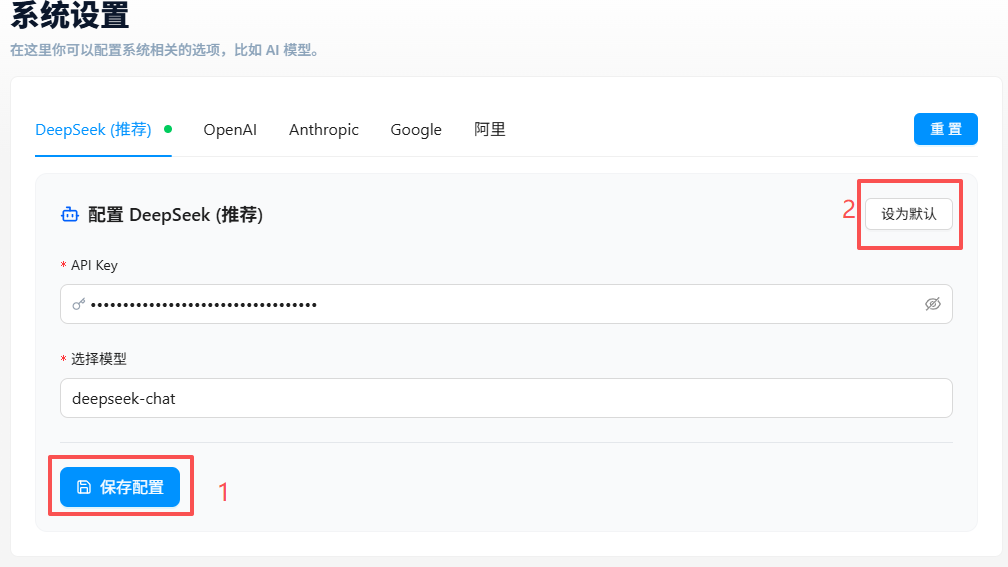
Supported Providers
| Provider | API Key URL | Available Models |
|---|---|---|
| DeepSeek | platform.deepseek.com/api_keys | deepseek-chat |
| Alibaba | bailian.console.aliyun.com | Qwen Flash, Qwen 3.7 Max, Qwen Plus, QwQ Plus, Qwen3 Coder Plus |
| Kimi (Moonshot) | platform.kimi.ai | kimi-k2.7-code, moonshot-v1-128k, kimi-k3 |
| OpenAI (ChatGPT) | platform.openai.com/account/api-keys | GPT-5.6 Luna, GPT-5.6 Sol, GPT-5.6 Terra, GPT-5.2 Pro, GPT-4o, o3-Mini, o1 |
| Anthropic (Claude) | console.anthropic.com/settings/keys | Claude Haiku 4.5, Claude Sonnet 4.6, Claude Opus 4.8, Claude Sonnet 5 |
| Google (Gemini) | aistudio.google.com/app/api-keys | Gemini 2.5 Flash, Gemini 2.5 Pro, Gemini 3 Pro Preview, Gemini Flash Latest |
Setup Steps
- Open the JTC RPA plugin settings panel and navigate to the AI Configuration page
- Select a provider, click its API key link, register on the platform, and create an API key
- Paste the obtained API key into the corresponding provider's input field
- Choose a specific model under that provider
- Save the configuration
Once configured, AI Condition, AI Switch, AI Smart Extraction, and other AI nodes will be ready to use.
FAQ
Which model should I choose?
Different models have different strengths. Here are general recommendations:
- Best value: DeepSeek-chat, Qwen Flash
- Best accuracy: Claude Sonnet 5 / Opus 4.8, GPT-5.6 Sol
- Free trial: Google Gemini typically offers free quota in AI Studio
How is the API key billed?
API key usage is billed independently by each model provider based on usage (token count). JTC RPA does not charge for API usage. Check the official pricing page of your chosen provider for specific billing details.
Can I configure multiple providers at once?
Yes. You can fill in API keys for multiple providers on the AI Configuration page. When using an AI node, you can choose which model to use for that specific call from the node's configuration panel.