WebSocket Trigger
The WebSocket trigger establishes a long-lived connection to receive server messages and triggers a workflow when the event field matches.
Overview
After connecting to a WebSocket server, the extension continuously listens for JSON messages pushed by the server. When the event field matches the configured "Trigger Event," the workflow starts automatically, and the data field is automatically JSON-parsed and stored in the specified variable. The configuration panel displays the current connection status in real time (Connected / Disconnected).
Messages pushed by the server must be in the following JSON format:
{
  "event": "task_notify",
  "data": {
    "url": "https://example.com/order/12345",
    "orderId": "12345"
  }
}
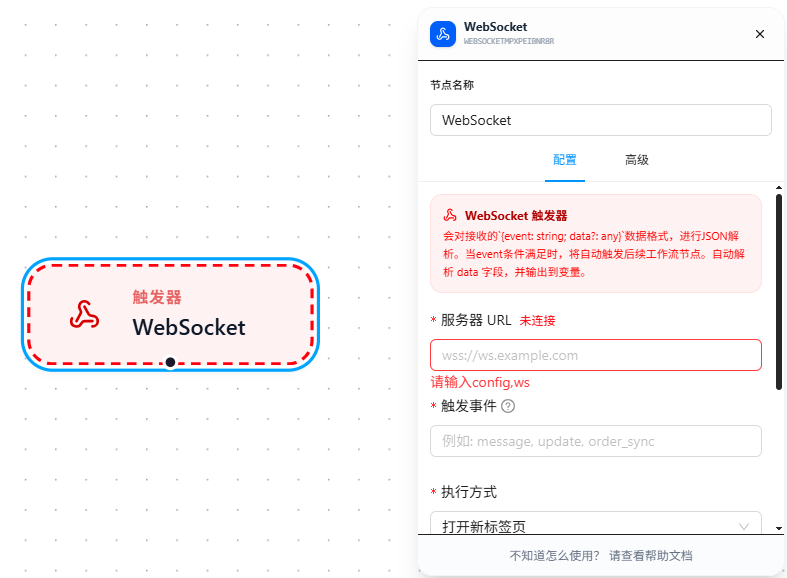
Quick Start
- Drag the "WebSocket Trigger" node onto the canvas
- Fill in the WebSocket server URL, e.g.,
wss://ws.example.com - Fill in "Trigger Event" — corresponds to the
eventfield value in server messages, e.g.,task_notify - Configure the execution mode and the variable name for receiving data
- When the server sends a matching message, the workflow starts automatically
Parameter Reference
| Parameter | Type | Default | Description |
|---|---|---|---|
| Server URL | Text | — | WebSocket address, required. Format: ws:// or wss:// |
| Trigger Event | Text | — | Matches the server message event field value, required |
| Execution Mode | Dropdown | — | Required. Open New Tab / Match Open Page |
| Execution Page URL | Text | — | Required for "Open New Tab" mode |
| Match Pattern | Text | — | Required for "Match Open Page" mode; see URL Match Patterns |
| Receive Data | Text | — | Variable name to store the parsed result of the data field |
| Activate Tab | Toggle | false | Whether to automatically switch to the target tab when triggered |
Execution Mode
Triggers support two execution modes, determining which page the workflow runs on:
| Mode | Description | Configuration Required |
|---|---|---|
| Open New Tab | Opens a new browser tab, loads the specified URL, then executes | Execution Page URL (required) |
| Match Open Page | Matches an already-open tab by URL pattern, executes on the matched page | Match Pattern (Chrome match patterns format; see URL Match Patterns) |
The Execution Page URL supports referencing received data via {{variableName}} (see Variables), enabling dynamic target page selection. Match patterns are fixed and do not support variables.
Receiving Parameters & Dynamic URL
When a trigger receives data, the data is parsed as JSON and stored in the variable configured in "Receive Data" (e.g., data). It can then be referenced anywhere in the workflow using {{ }} expressions.
Typical Usage: When the received data includes a url field, you can dynamically specify the target page in "Execution Page URL" via the variable.
Example received data:
{
  "url": "https://shop.example.com/order/12345",
  "orderId": "12345"
}
Trigger configuration:
Receive Data: data
Execution Page URL: {{data.url}}
During workflow execution, nodes such as Open Page can also reference fields like {{data.orderId}}.
FAQ
Connection status always shows "Disconnected"
Symptom: Configured the server URL, but the panel consistently shows a red "Disconnected" status.
Cause: The server address is unreachable, or the URL format is incorrect.
Solution: First verify the server is reachable using an online WebSocket testing tool; confirm the URL starts with ws:// or wss://.