SSE Trigger
The SSE (Server-Sent Events) trigger connects to a server SSE endpoint and triggers a workflow when the event type matches.
Overview
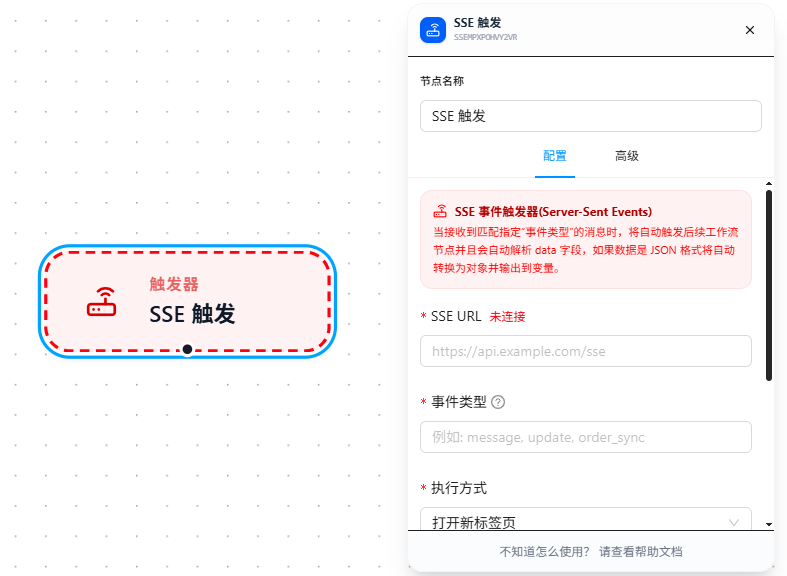
After connecting to an SSE endpoint, the extension continuously receives event streams pushed by the server. When the event's event: type matches the configured "Event Type," the workflow starts automatically, and the data: field is automatically JSON-parsed and stored in the specified variable. The configuration panel displays the current connection status in real time (Connected / Disconnected).
Server-pushed SSE event format:
event: task_notify
data: {"url": "https://example.com/order/12345", "orderId": "12345"}
Quick Start
- Drag the "SSE Trigger" node onto the canvas
- Fill in the SSE endpoint URL, e.g.,
https://api.example.com/sse - Fill in "Event Type" — corresponds to the
event:field value in the SSE protocol, e.g.,task_notify,message,order_sync - Configure the execution mode and the variable name for receiving data
- When the server pushes a matching event, the workflow starts automatically
Parameter Reference
| Parameter | Type | Default | Description |
|---|---|---|---|
| SSE URL | Text | — | SSE endpoint address, required |
| Event Type | Text | — | Matches the SSE protocol event: field value, e.g., message, required |
| Execution Mode | Dropdown | — | Required. Open New Tab / Match Open Page |
| Execution Page URL | Text | — | Required for "Open New Tab" mode |
| Match Pattern | Text | — | Required for "Match Open Page" mode; see URL Match Patterns |
| Receive Data | Text | — | Variable name to store the parsed result of the data: field |
| Activate Tab | Toggle | false | Whether to automatically switch to the target tab when triggered |
Execution Mode
Triggers support two execution modes, determining which page the workflow runs on:
| Mode | Description | Configuration Required |
|---|---|---|
| Open New Tab | Opens a new browser tab, loads the specified URL, then executes | Execution Page URL (required) |
| Match Open Page | Matches an already-open tab by URL pattern, executes on the matched page | Match Pattern (Chrome match patterns format; see URL Match Patterns) |
The Execution Page URL supports referencing received data via {{variableName}} (see Variables), enabling dynamic target page selection. Match patterns are fixed and do not support variables.
Receiving Parameters & Dynamic URL
When a trigger receives data, the data is parsed as JSON and stored in the variable configured in "Receive Data" (e.g., data). It can then be referenced anywhere in the workflow using {{ }} expressions.
Typical Usage: When the received data includes a url field, you can dynamically specify the target page in "Execution Page URL" via the variable.
Example received data:
{
  "url": "https://shop.example.com/order/12345",
  "orderId": "12345"
}
Trigger configuration:
Receive Data: data
Execution Page URL: {{data.url}}
During workflow execution, nodes such as Open Page can also reference fields like {{data.orderId}}.
FAQ
Connection status always shows "Disconnected"
Symptom: Configured the SSE URL, but the panel consistently shows a red "Disconnected" status.
Cause: The server address is unreachable, or the endpoint doesn't respond according to the SSE specification (must return Content-Type: text/event-stream).
Solution: Check the SSE connection status in the browser DevTools Network panel, and confirm the server response headers are correct.