Wait HTTP
The Wait HTTP node listens for browser network requests and automatically extracts response data when a matching target request is detected.
Overview
Pre-registers a listener. When the browser makes a request matching the specified URL pattern, the response data is automatically captured. The node must execute before the operation that triggers the request — otherwise, the request may be sent before the listener is registered.
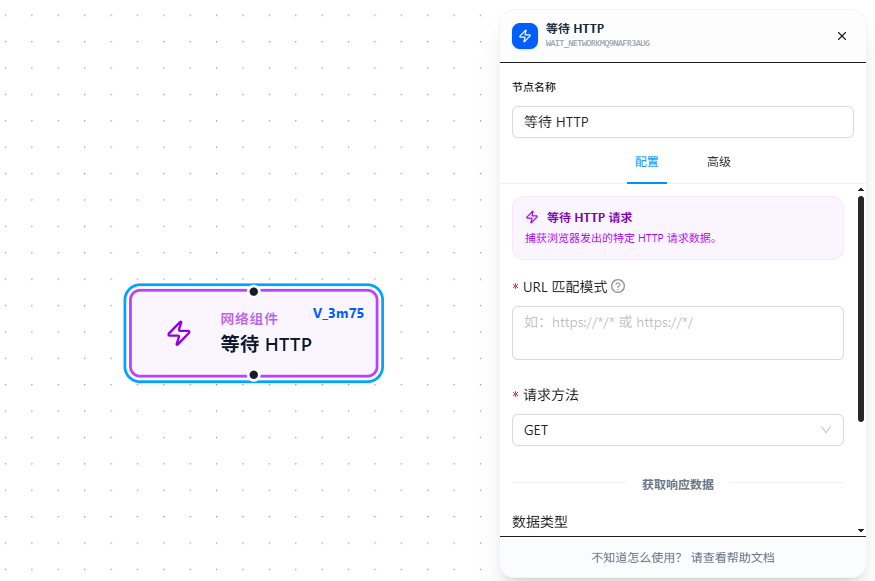
Usage
After dragging in the node, configure the following four items:
URL Match Pattern
Required. Match request addresses using Chrome match patterns format. Copy the full URL from the Network panel, then rewrite it into a wildcard pattern as needed.
HTTP Method
Required. Select the HTTP method to capture: GET, POST, PUT, DELETE. Only requests matching the method will be captured.
Data Type
Controls how the response data is parsed:
| Type | Behavior | Best For |
|---|---|---|
| Auto | Attempts JSON parsing; returns the parsed object/array on success, raw text on failure | When unsure of the response format |
| JSON | Forces JSON parsing; returns the raw content on failure | When the response is definitely JSON |
| Text | Converts directly to a string | When the response is plain text or HTML |
Output Variable
After filling in a variable name, the captured response data is stored in that variable, available downstream via {{variableName}}.
Parameter Reference
| Parameter | Type | Default | Description |
|---|---|---|---|
| URL Match Pattern | Text | — | Required. Chrome match patterns format; see URL Match Patterns |
| HTTP Method | Dropdown | — | Required. GET / POST / PUT / DELETE |
| Data Type | Dropdown | auto | auto — auto-detect; json — JSON parse; text — plain text |
| Output Variable | Text | — | Variable name to store the response data |
FAQ
Request is visible in the Network panel but wasn't captured
Symptom: The request completed in DevTools, but the node didn't capture it.
Cause: The URL match pattern didn't hit the actual request path, or the node registered its listener after the request was already sent.
Solution: Ensure the Wait HTTP node executes before the operation that triggers the request; copy the full URL from the Network panel to calibrate the match rules.