Send HTTP
The Send HTTP node sends a request directly to a server, bypassing the page UI to communicate with the backend. It's faster than clicking through the page and doesn't depend on DOM elements.
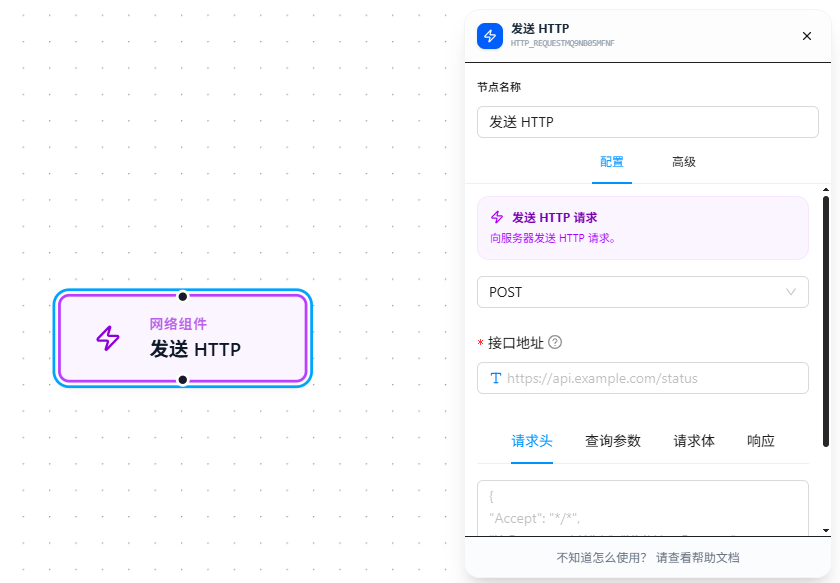
Usage Examples
Scenario: Call an API to get data, process it, and store it in a variable
Set Variable (token) → Send HTTP → Print Output (response)
- Method:
GET - URL:
https://api.example.com/orders?page=1 - Headers:
{"Authorization": "Bearer {{token}}"} - Response Type:
json - Output Variable:
orders
After a successful request, {{orders}} contains the JSON data returned by the API. Downstream nodes can directly reference fields like {{orders.list}}, {{orders.total}}.
Scenario: POST data submission
Send HTTP (POST, body: {{formData}}) → Print Output
For debugging, use webhook.site — it generates a unique URL on open. Send your request there to view the complete method, headers, and body in real time without setting up a backend.
Parameter Reference
| Parameter | Type | Default | Description |
|---|---|---|---|
| Method | Dropdown | GET | GET / POST / PUT / DELETE |
| URL | Text | — | Required. Supports {{variableName}} references |
| Headers | JSON | — | Key-value format, e.g., {"Authorization": "Bearer {{token}}"} |
| Query Parameters | JSON | — | URL params, automatically appended to the URL |
| Content-Type | Dropdown | — | application/json / text/plain / multipart/form-data / application/x-www-form-urlencoded |
| Body | JSON | — | Only available for non-GET methods. Supports {{variableName}} |
| Response Type | Dropdown | json | json / text |
| Output Variable | Text | — | Variable name to store the response data |
FAQ
Request returns 401 or 403
Cause: The API requires an authentication token.
Solution: Add {"Authorization": "Bearer {{token}}"} in "Headers." The token can be configured in advance via Set Variable.