Send Signal
The Send Signal node broadcasts a signal system-wide to trigger other workflows.
Overview
Paired with the Signal Trigger node in a publish/subscribe pattern. After sending a signal, the main workflow immediately continues execution without waiting for receivers to complete. Suitable for notification-style, trigger-style asynchronous scenarios.
If you need to synchronously wait for receivers to complete and get a return value, use the Call Flow node instead.
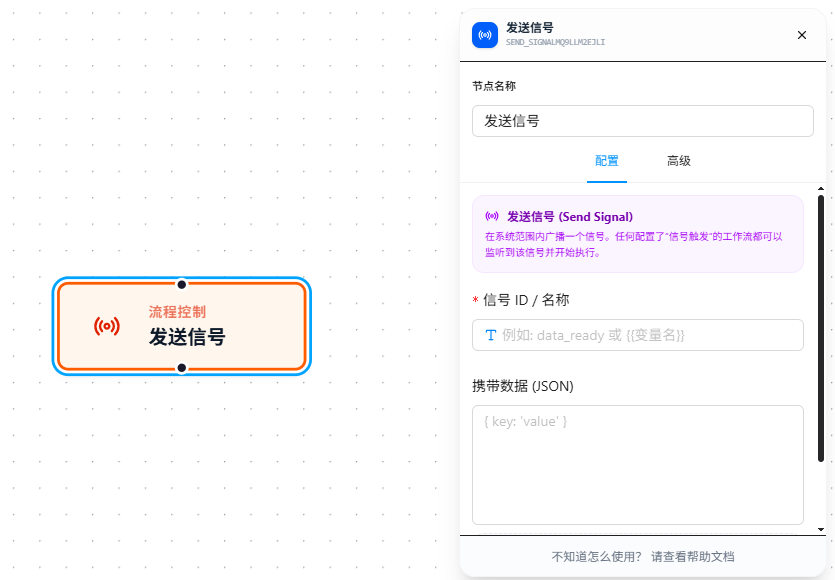
Usage
After dragging in the node, configure the following two items:
Signal ID
The unique identifier for the signal. The receiver's "Signal Trigger" node listens using the same signal ID. Supports {{variableName}} references for dynamic routing — decide which receiver to notify based on upstream data.
Carry Data
JSON data sent along with the signal. The receiver obtains it via the Signal Trigger's "Receive Data" field, in the same way as Call Flow's Carry Data. Also supports {{variableName}} references.
Parameter Reference
| Parameter | Type | Default | Description |
|---|---|---|---|
| Signal ID | Text | — | Required. Signal identifier; must match the receiver's "Signal Trigger" node. Supports {{variableName}} references |
| Carry Data | JSON | — | Data sent with the signal; received by the receiver's trigger "Receive Data." Supports {{variableName}} references |
FAQ
Receiver doesn't react after sending a signal
Symptom: Sent a signal, but the receiver workflow didn't start.
Cause: Signal ID mismatch (case-sensitive), or the receiver workflow is not in an active listening state.
Solution: Confirm the signal IDs on both sides match exactly; check that the receiver workflow is saved and the Signal Trigger node is configured correctly.
Need to wait for the receiver to finish and get results
Symptom: Want to get the receiver's processing result in the current workflow after sending a signal.
Cause: Signals are asynchronous — execution continues immediately after sending, and return values cannot be obtained.
Solution: If synchronous waiting for results is needed, use the Call Flow node instead of the signal mechanism.