Loop
The Loop node makes a sub-workflow execute repeatedly. Four loop modes are supported.
Overview
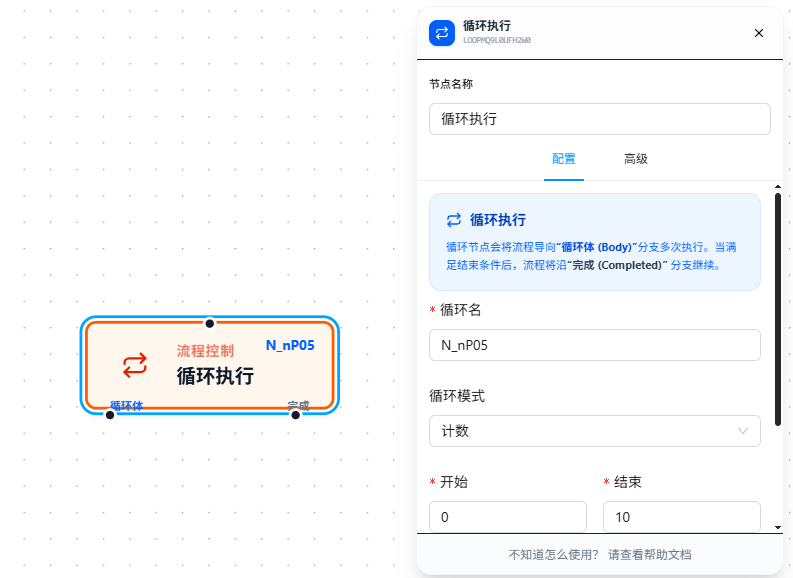
After filling in the loop name, the node automatically generates two loop variables for use inside the loop body:
{{loopName.index}}— the current iteration index (starting from 0){{loopName.value}}— the current iteration value
The node has two output ports: Body connects the loop body (executes on each iteration), and Completed connects downstream nodes after the loop ends.
Loop state (index, queue, watermark) is persisted between iterations and survives page refreshes without losing progress.
Usage
After dragging in the node, first fill in "Loop Name," then select the loop mode.
Count Mode
Iterates from a start number to an end number one by one. Internal logic: start + index; continues while currentValue < endValue.
Note: The end value is exclusive (similar to Python's
range), not "less than or equal."
Loop Name: i, Start: 1, End: 3
Iteration 1: i.index=0, i.value=1  (1 < 3 ✓)
Iteration 2: i.index=1, i.value=2  (2 < 3 ✓)
Loop ends                           (3 < 3 ✗)
Best for "repeat N times" scenarios.
Array Mode
Iterates over each element of an array. The array content is entered in JSON5 format, parsed and placed into a consumption queue. Each iteration takes one element from the front of the queue (shift); the loop ends when the queue is empty.
Loop Name: user, Array: ["Alice", "Bob", "Charlie"]
Initial queue: ["Alice", "Bob", "Charlie"]
Iteration 1: user.index=0, user.value="Alice"   (queue: ["Bob", "Charlie"])
Iteration 2: user.index=1, user.value="Bob"     (queue: ["Charlie"])
Iteration 3: user.index=2, user.value="Charlie" (queue: [])
Loop ends
Best for "do the same thing to each element in a list" scenarios.
Variable Mode
References an upstream variable for iteration. The strategy is auto-selected based on the variable type:
- Variable is a number (e.g.,
5): Executes in count mode —indexfrom 0 to N-1,valueequalsindex. Continues whileindex < variableValue. - Variable is an array or other: Executes in incremental queue mode. Only newly appearing elements are added to the consumption queue (deduplicated via a
globalCursorwatermark). Already-consumed elements are not processed again.
# Numeric variable
Loop Name: i, Variable Reference: {{count}}  (count = 3)
Iteration 1: i.index=0, i.value=0
Iteration 2: i.index=1, i.value=1
Iteration 3: i.index=2, i.value=2
Loop ends

# Array variable
Loop Name: item, Variable Reference: {{dataList}}  (dataList = ["A", "B", "C"])
→ Consumes "A", "B", "C" sequentially, same behavior as array mode
→ If dataList gets new elements during the loop, they are automatically appended to the queue on the next round
Condition Mode
Continues looping while a condition is satisfied; exits when the condition is no longer met. The condition builder works the same way as in Condition Branch — configure left value, operator, and right value. The variables are dynamically resolved and re-evaluated before each iteration.
Note: Condition mode is the easiest to create an infinite loop with. Ensure each iteration changes the variable referenced in the condition so it eventually becomes False; otherwise, the workflow will never exit the loop.
Parameter Reference
| Parameter | Type | Default | Description |
|---|---|---|---|
| Loop Name | Text | — | Required. Loop identifier; also used to generate {{loopName.index}} and {{loopName.value}} |
| Loop Mode | Dropdown | range | range — count; array — array; variable — variable; condition — condition |
| Start | Number | 1 | Count mode — start number |
| End | Number | 10 | Count mode — end number (exclusive; continues while current < end) |
| Array | array | — | Array mode — JSON5 format array, e.g., ["A","B","C"] |
| Variable Reference | Text | — | Variable mode — reference an existing variable. Numbers use count logic; others use array logic |
| Condition | ConditionBuilder | — | Condition mode — continues looping while condition is satisfied; exits when False |
FAQ
Infinite loop won't stop
Symptom: The workflow enters a loop and can't exit.
Cause: In condition mode, the condition is always satisfied — nothing in the loop body changes the referenced variable.
Solution: Ensure the loop body has steps that change the variable referenced in the condition so it eventually becomes False. Count/array/variable modes have explicit iteration endpoints and won't loop infinitely.
Count mode executes fewer times than expected
Symptom: Set Start=1, End=3, expected 3 iterations, but only got 2.
Cause: The end value is exclusive (<, not <=). Continues while start + index < end, so 3 < 3 is False and the loop ends immediately.
Solution: To include the end value, set End to desired value + 1. For example, to execute 3 times (1, 2, 3), set End to 4.