Condition Branch
The Condition Branch node implements if-else logic using a visual condition builder.
Overview
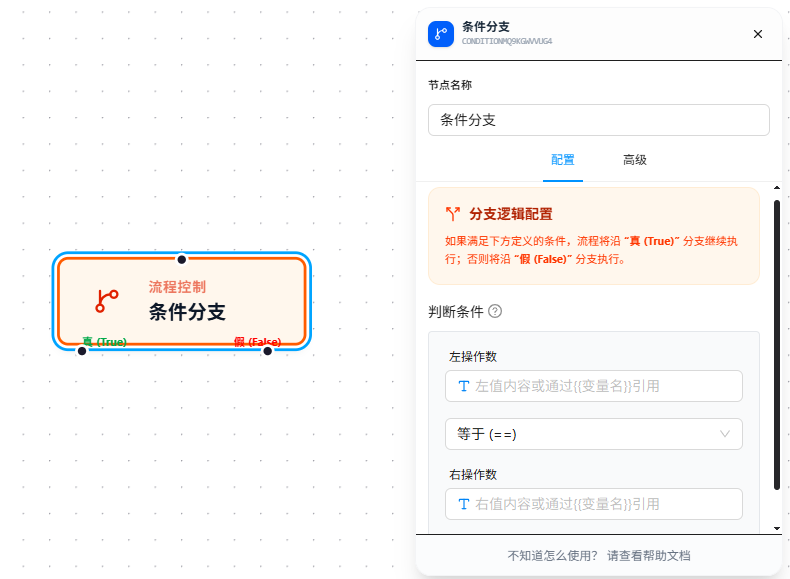
Use the condition builder to visually configure a left value, operator, and right value — no manual coding needed. If the condition is satisfied, the flow takes the True branch; otherwise, it takes the False branch.
Usage
After dragging in the node, configure three items in the condition builder:
- Left Value: The variable or constant to evaluate, typically referencing an upstream node's output variable, e.g.,
{{variableName}} - Operator: Choose a comparison method from 10 options (detailed below)
- Right Value: The target value to compare against.
empty/not_emptydo not require a right value
After configuration, connect the True and False output ports to their corresponding downstream nodes.
Operator Reference
== Equals
Checks whether the left value equals the right value.
- Comparison rules: first tries strict equality (
===); if not equal, falls back to string comparison - Arrays: recursively compares element by element — considered equal only if length and every element match
Left: "hello"  Right: "hello"  → True
Left: 10       Right: "10"     → True  (equal after string conversion)
Left: [1,2]    Right: [1,2]    → True
Left: [1,2]    Right: [2,1]    → False (different order)
!= Not Equals
Negation of ==. Returns True when the left value does not equal the right value.
> Greater Than
Numeric comparison. Returns True when the left value is greater than the right value.
- If left value is an array, uses the array length for comparison
- Non-numeric values that fail conversion are treated as
0
Left: 10       Right: 5       → True
Left: [1,2,3]  Right: 2       → True  (array length 3 > 2)
< Less Than
Numeric comparison. Returns True when the left value is less than the right value. Same rules as >.
>= Greater Than or Equal
Numeric comparison. Returns True when the left value is greater than or equal to the right value. Same rules as >.
<= Less Than or Equal
Numeric comparison. Returns True when the left value is less than or equal to the right value. Same rules as >.
contains Contains
Checks whether the left value contains the right value.
- Left value is an array: checks whether the right value is an element in the array
- Left value is a string: checks whether the right value is a substring
Left: "hello world"  Right: "world"  → True
Left: ["a","b","c"]  Right: "b"      → True
Left: [1,2,3]        Right: 4        → False
not_contains Does Not Contain
Negation of contains. Returns True when the left value does not contain the right value.
empty Is Empty
Checks whether the left value is empty. No right value is needed.
The following are considered empty:
| Left Value Type | Condition for Empty |
|---|---|
| String | "" (empty string) |
| Array | [] (length 0) |
| Object | {} (no properties) |
| Other | null / undefined |
Left: ""       → True
Left: []       → True
Left: null     → True
Left: "hello"  → False
Left: [1,2]    → False
not_empty Is Not Empty
Negation of empty. Returns True when the left value is not empty. Also does not require a right value.
About Type Conversion
The condition evaluation engine automatically preprocesses the left value:
- JTCElement values: Automatically extracts the element's text content, trimmed of leading/trailing whitespace
- Array values: Recursively cleans the type of each internal element
- Numeric comparison (
><>=<=): Arrays use their length; other values callparseFloat; conversion failures are treated as0
Note:
==and!=fall back to string comparison on failure, so10 == "10"is True. To strictly distinguish types, convert types upstream using the Data Transform Pipeline in Set Variable.
Parameter Reference
| Parameter | Type | Default | Description |
|---|---|---|---|
| Condition | ConditionBuilder | — | Visual condition builder. Configure left value, operator, and right value |
FAQ
contains doesn't match a substring
Symptom: The string clearly contains the target substring, but returns False.
Cause: contains is case-sensitive for strings. "Hello" contains "ello" → True, but contains "hello" → False.
Solution: If case-insensitive matching is needed, use the Data Transform Pipeline in Set Variable to convert the variable to lowercase (lower operator) upstream before comparing.
Unexpected numeric comparison results
Symptom: The left value is a numeric string, but the comparison result doesn't match expectations.
Cause: > < >= <= internally use parseFloat. parseFloat("abc") returns NaN, which falls back to 0 — so "abc" > 5 actually becomes 0 > 5 → False.
Solution: Ensure the left value in numeric comparisons is actually a number. Use the toNumber operator in Set Variable to convert it upstream.