AI Switch
The AI Switch node uses an AI model to semantically evaluate input content and automatically picks the best-matching branch from a set of natural-language conditions, then routes the workflow to the corresponding output port.
Unlike a regular Multi-Branch (Switch), you don't need to specify exact match values or worry about "exact match vs. contains match" — just write each branch condition in plain language, and the AI will decide which path fits best.
When to Use
A regular Switch requires you to know in advance what specific values a variable might take (e.g., status equals "shipped", "pending payment"...). But many real-world classification scenarios can't be exhausted with exact values:
- Determining what kind of page the user is on based on content (product page, listing page, cart, checkout...)
- Categorizing scraped text by business type (normal product, ad/promotion, related recommendation...)
- Deciding the next action based on page state (normal browsing, popup appeared, CAPTCHA triggered, blank page...)
In these scenarios, the classification logic is semantic, not value-based. AI Switch is built for exactly this.
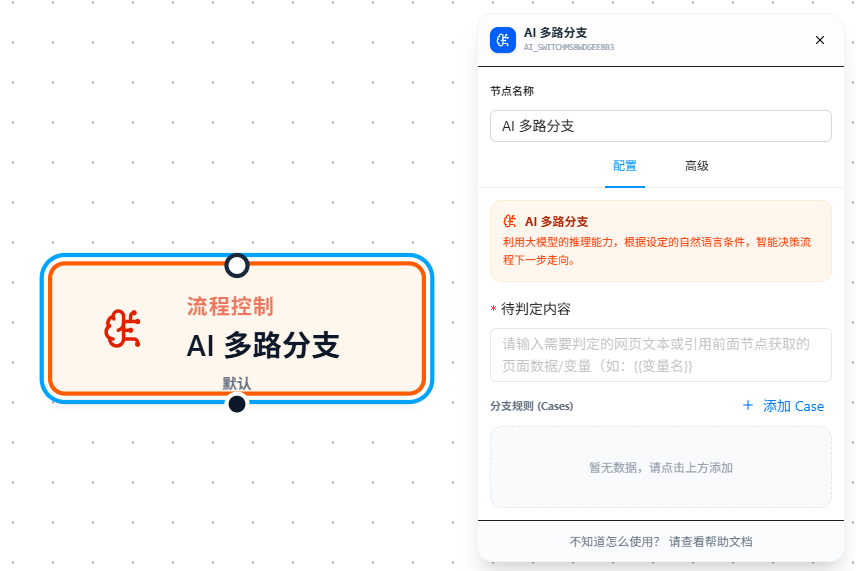
Configuration
Content to Evaluate
Enter the text that the AI should classify. This is typically page text, an API response, or a variable value collected upstream. Supports {{variableName}} references.
Branch Rules (Cases)
Define multiple branch conditions, each using natural language to describe a classification criterion. Click Add Case to add a branch — each case corresponds to one output port on the node.
For example, if you're scraping an e-commerce site and want to determine which type of page the user has landed on:
| Branch Condition |
|---|
| The current page is a product detail page, containing product title, price, and specifications |
| The current page is a product listing / search results page, containing multiple product cards |
| The current page is a shopping cart page, containing a checkout button and product list |
| The current page has a login popup or CAPTCHA verification shown |
Important: Cases are evaluated top-to-bottom. Once a match is found, subsequent cases are not checked. Place more specific, narrower conditions at the top.
Default Branch
If the content does not match any of the defined case conditions, the workflow takes the Default branch. The Default branch always exists and requires no extra configuration, but it must be connected to a downstream node — ensuring the workflow always has a fallback path.
How It Works
When the node executes:
- Resolve variable references in the content field
- Send the content and all case conditions together to the AI model
- The AI compares semantic fit against each case and selects the best-matching one
- If no case fits, the AI returns
"default" - The workflow proceeds through the output port corresponding to the matched case (or Default)
Parameter Reference
| Parameter | Description |
|---|---|
| Content to Evaluate | Required. The text for the AI to classify. Supports {{variableName}} references |
| Branch Rules (Cases) | At least one required. Natural language descriptions for each branch's matching criteria. Can be dynamically added or removed |
FAQ
How is this different from a regular Multi-Branch? When should I use which?
| Regular Multi-Branch | AI Switch | |
|---|---|---|
| Matching method | Exact value or contains match | AI semantic understanding |
| Condition format | Specific match values (e.g., "shipped") | Natural language (e.g., "The page shows that the order has been shipped") |
| Best for | Enumerable, deterministic variable values | Semantic classification with non-exhaustive criteria |
| Speed | Instant | Waits for AI response (slightly slower) |
| Cost | None | Small amount of AI tokens |
Recommendation: When variable values are enumerable and deterministic, use a regular Multi-Branch. Reserve AI Switch for scenarios with fuzzy, semantic classification criteria.
What happens if the content matches multiple cases?
Cases are evaluated top-to-bottom. The AI considers both "highest semantic fit" and "listed first" as tiebreakers. In other words: if two cases both match, the AI picks the one with stronger semantic alignment; if fit is equal, the one listed higher wins. Place more specific, narrower conditions at the top.
The classification is inaccurate. What can I do?
- Write more specific conditions: Instead of "page is normal", write "the page loaded completely and displays a product listing or detail content". Instead of "page is abnormal", write "the page shows a login popup, slider CAPTCHA, or error message"
- Narrow the content scope: Don't feed raw full-page HTML to the AI. Use Set Variable upstream to extract key text passages, then pass those to the AI
- Reorder your cases: Differentiate easily-confused conditions by using more specific wording, and place narrower criteria first
What prerequisites are needed?
Same as AI Condition — you must complete the AI model configuration in the plugin settings (API key, model selection, etc.). If not configured, the configuration panel will prompt you to set up AI first.