AI Condition
The AI Condition node leverages an AI model to semantically evaluate input content and return either True or False. Unlike a regular Condition Branch, you don't need to configure precise operators and comparison values — just tell the AI "what to judge and how to judge it" in plain language.
When to Use
Regular condition branches are great for exact comparisons — equals, greater than, contains a substring, etc. But some judgments are semantic in nature and can't be expressed with simple operators:
- Detecting whether a page shows a "Please log in first" popup (the exact wording varies wildly across sites)
- Determining whether a product is out of stock / delisted (each site phrases it differently)
- Identifying whether scraped content is spam / junk data
- Checking whether the current page has triggered anti-bot verification (CAPTCHA, slider, etc.)
What these scenarios share: the judgment criterion is about meaning, not exact matching. AI Condition is built for exactly this.
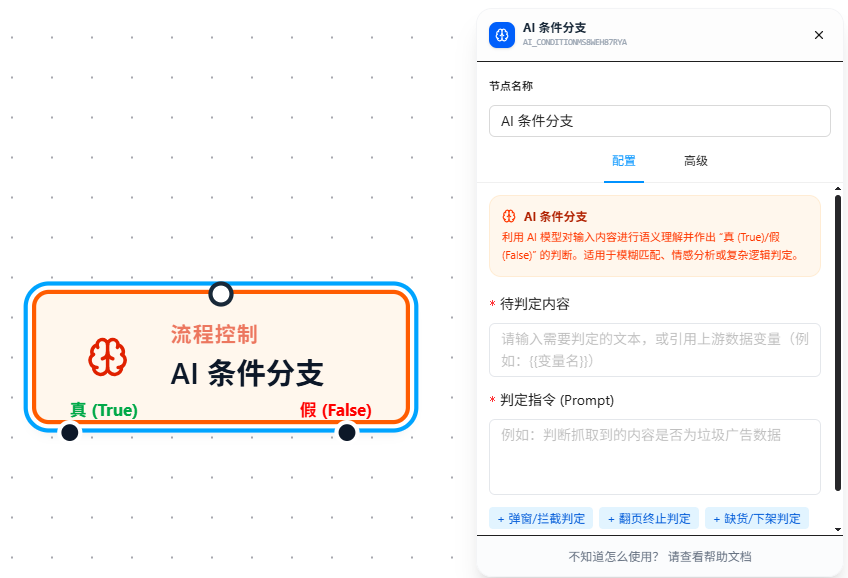
Configuration
Content to Evaluate
Enter the text that the AI should judge. This is typically page text, an API response, or a variable value collected by an upstream node. Supports variable references, e.g., {{pageText}}.
If the referenced variable is an object or array, it will be automatically converted to text at runtime before being passed to the AI — no manual conversion needed.
Judgment Prompt
Use natural language to tell the AI how to judge. The more specific you are, the more accurate the result.
| Scenario | Judgment Prompt |
|---|---|
| Login popup detection | Determine whether the extracted page content contains login prompts or interception messages such as "Please log in", "Login required", or "Sign in to continue". |
| Pagination end detection | Check whether the pagination text at the bottom of the page contains cues like "No more results", "All loaded", or "Last page". |
| Out-of-stock detection | Determine whether the product detail text explicitly indicates "Out of stock", "Sold out", or "Currently unavailable". |
| Anti-bot verification | Check whether the extracted page content contains risk-control warnings such as "Too many requests", "Complete CAPTCHA", or "Verify you are human". |
Quick Templates
The configuration panel provides 4 preset templates for common scenarios. Click a tag to fill the Prompt field — you can still edit it afterward:
- Popup / Interception — Detect login popups, interception prompts
- Pagination End — Detect whether pagination has reached the end
- Out of Stock / Delisted — Detect whether a product is unavailable
- Anti-Bot / CAPTCHA — Detect whether anti-scraping verification has been triggered
How It Works
When the node executes:
- Resolve variable references in both the content and prompt fields
- Send the content and judgment prompt to the AI model
- The AI returns a verdict: True (condition met) or False (condition not met)
- The workflow proceeds through the corresponding output port — the upper port is the True branch, the lower port is the False branch
Parameter Reference
| Parameter | Description |
|---|---|
| Content to Evaluate | Required. The text for the AI to judge. Supports {{variableName}} references |
| Judgment Prompt | Required. Natural language instructions describing how the AI should evaluate |
FAQ
How is this different from a regular Condition Branch? When should I use which?
| Regular Condition Branch | AI Condition | |
|---|---|---|
| Evaluation method | Exact comparison (10 operators: equals, contains, etc.) | AI semantic understanding |
| Best for | Deterministic judgments (numeric comparisons, string matching) | Fuzzy judgments (meaning / semantic analysis) |
| Speed | Instant | Waits for AI response (slightly slower) |
| Cost | None | Small amount of AI tokens |
A real-world example: you want to detect whether a page has shown a login popup. Different sites use different wording — "Please log in to continue", "You must sign in first", "Login required to proceed"... Using contains in a regular condition branch, it's nearly impossible to enumerate every possible phrasing. With AI Condition, you simply write "Determine whether the page is asking the user to log in", and the AI understands.
Recommendation: When exact comparisons can do the job, use a regular Condition Branch. Reserve AI Condition for scenarios where the judgment criteria are semantic and cannot be exhaustively enumerated.
The judgment result is inaccurate. What can I do?
- Make your prompt more specific: Instead of "check if it's an ad", write "check whether the content contains promotional links, marketing slogans, or third-party ad identifiers"
- Narrow the content scope: Don't feed raw full-page HTML to the AI. Use Set Variable upstream to extract the key text passages, then pass those to the AI
- Try different phrasing: Sometimes rewording your prompt can help the AI understand more accurately
What prerequisites are needed?
Before using AI Condition, you must complete the AI model configuration in the plugin settings (API key, model selection, etc.). If not configured, the configuration panel will prompt you to set up AI first.